
Edible Ink Cartridges: Care, Refilling & Common Problems
Posted by Tanya Montgomery on 23rd Sep 2026
Edible ink cartridges are designed to be refilled and reused, but like any part of your edible printing system, they need a little care to keep performing at their best.
Regular printer use, good maintenance habits, and correctly refilling your cartridges can help prevent many common edible printing problems.
From knowing when to refill or replace a cartridge to understanding chips, ink flow, storage and those all-important orange cradles, we've brought together some of the most common questions we receive about edible ink cartridges.
Trying to solve a cartridge problem right now? Start with our Edible Ink Cartridge Troubleshooting: Quick & Easy Guide. The troubleshooting flowchart will take you through the checks in the right order and help you narrow down what's causing the problem.
Keep Your Edible Ink Cartridges Topped Up
When using refillable edible ink cartridges, it's important not to allow them to run completely dry.
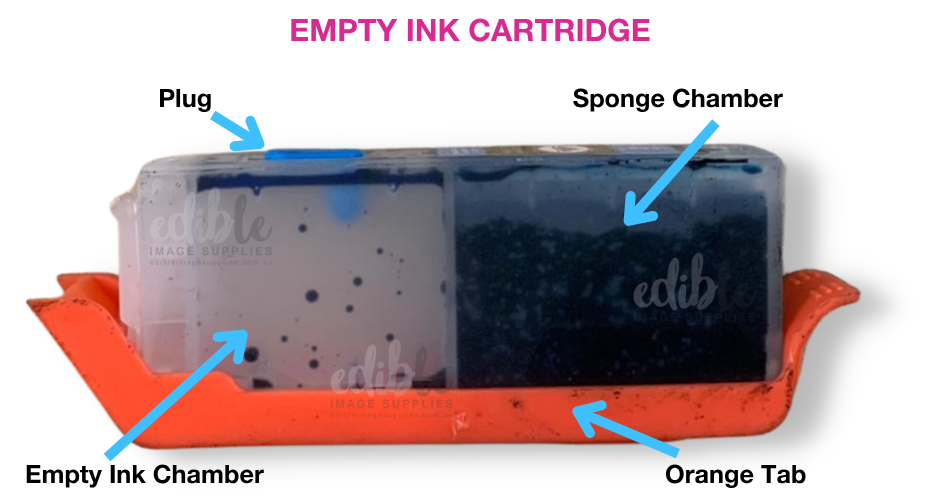
A refillable cartridge has both a main ink cavity and a sponge section. There needs to be sufficient ink in the cartridge, and the sponge needs time to absorb the ink so it can flow correctly.
When it's time for a refill:
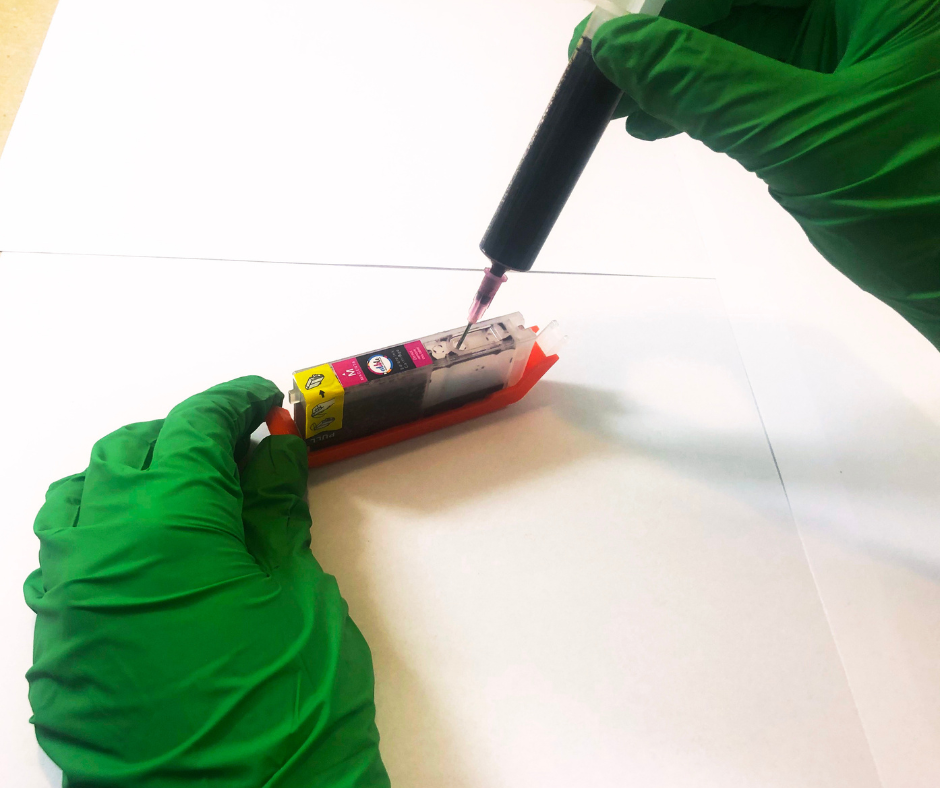
- Place the cartridge securely into its orange cradle.
- Refill the cartridge following the recommended instructions.
- Make sure there is sufficient ink in both the main cavity and sponge side.
- Replace the coloured refill plug.
- Allow time for the sponge to absorb the ink before reinstalling the cartridge.
Keeping an eye on your ink levels and refilling before the cartridge is completely empty can help maintain consistent ink flow.
TIP: Wear protective gloves whenever you're handling or refilling edible ink cartridges. Edible ink has an impressive ability to find fingers!
Keep Those Orange Cradles!
When you receive your refillable edible ink cartridges, don't throw away the orange cradles they arrive in.
You'll need them every time you refill your cartridges.
The orange cradle seals the outlet at the bottom of the cartridge and helps prevent ink from escaping while you're refilling it.
Always place the cartridge securely into its orange cradle before adding ink.
Once you've finished refilling:
- Replace the coloured refill plug.
- Remove the cartridge from the orange cradle.
- Insert the cartridge promptly into your printer.
Keep your orange cradles somewhere safe and clean, ready for your next refill.
For detailed refilling instructions, visit our FAQs and YouTube.

How Many Times Can I Refill an Edible Ink Cartridge?
We recommend refilling our edible ink cartridges a maximum of four times before replacing them with a new cartridge.
Although refillable cartridges are designed to be reused, they're still a consumable item and won't last indefinitely.
Over time, components such as the outlet port can wear, which can affect ink flow and cartridge performance.
If you've successfully refilled a cartridge several times and it suddenly starts causing problems, it may simply be time to replace it.
Replacing cartridges at the recommended interval can help maintain reliable printing and avoid unnecessary troubleshooting.
Understanding Edible Ink Cartridge Chips
Our refillable edible ink cartridges contain specialised chips that allow the cartridges to be refilled and reused.
Not all cartridges sold as "refillable" work in the same way. Some cartridges use a one-time chip. Once the printer determines that the cartridge has reached empty, it may no longer recognise the cartridge even if more ink is added.
Very occasionally, a cartridge chip can also be faulty. However, a cartridge not being recognised doesn't automatically mean there's a problem with its chip.
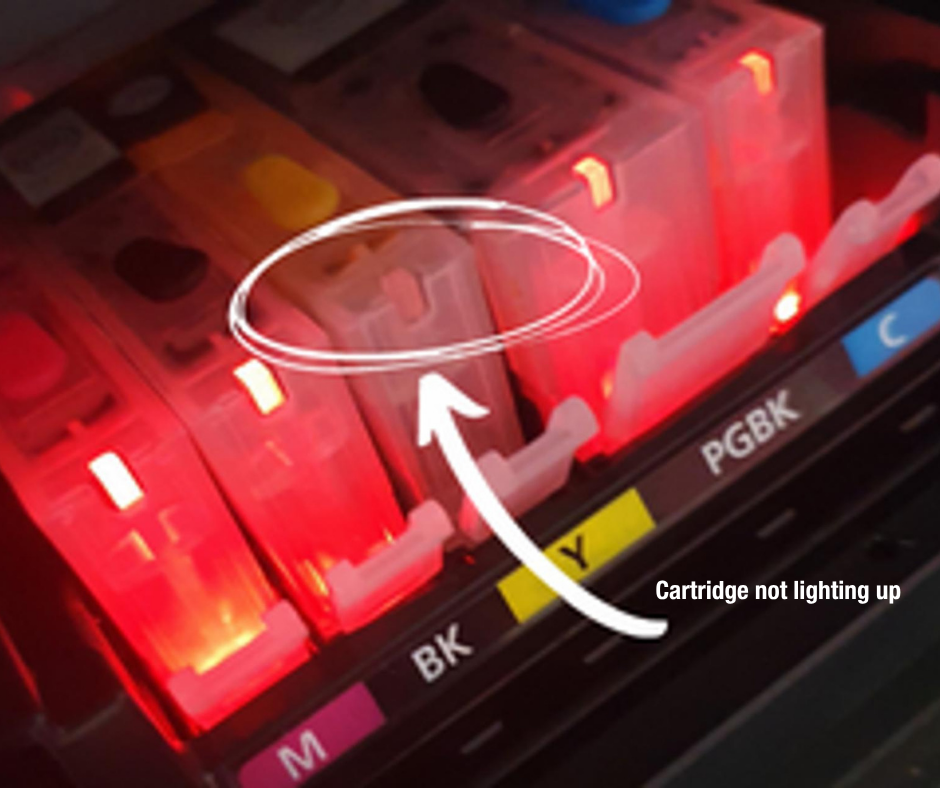
If one of our smaller cartridges doesn't light up in its correct slot, it can be temporarily placed into another cartridge slot as a simple test.
If it lights up in another slot, the chip is working, and there may instead be an issue with the printer pins in the original cartridge slot.
If it doesn't light up in either slot, the cartridge chip may be faulty.
Our Edible Ink Cartridge Troubleshooting: Quick & Easy Guide takes you through this check step by step.
Make Sure You're Using the Correct Cartridge
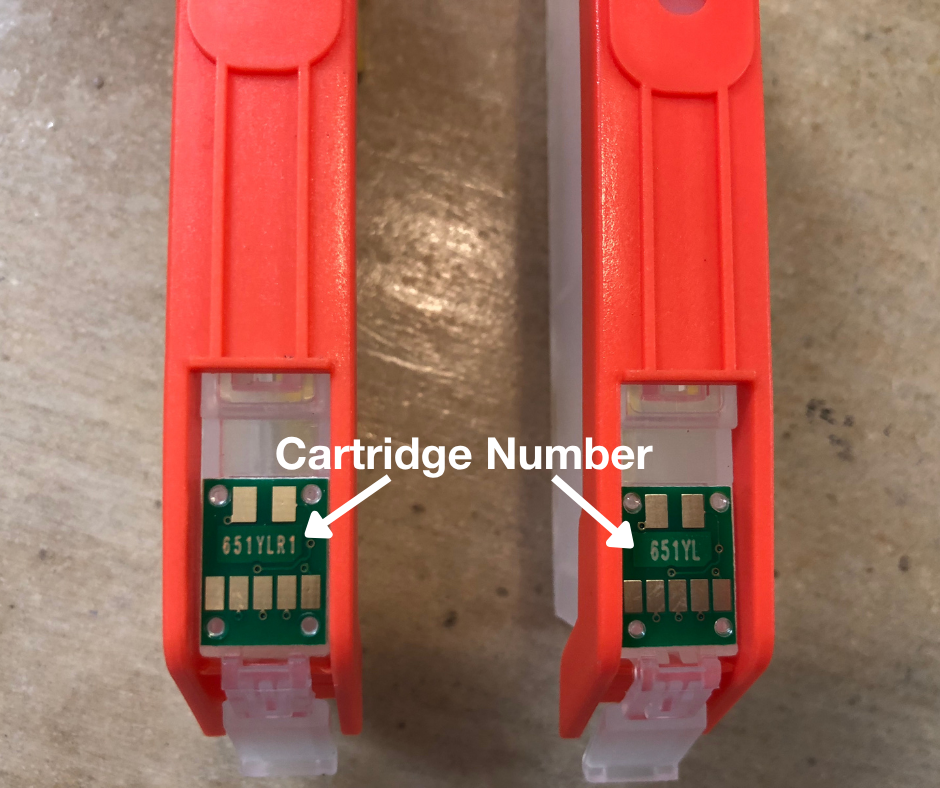
Different printer models require different cartridge models, so it's important to check compatibility before ordering replacements.
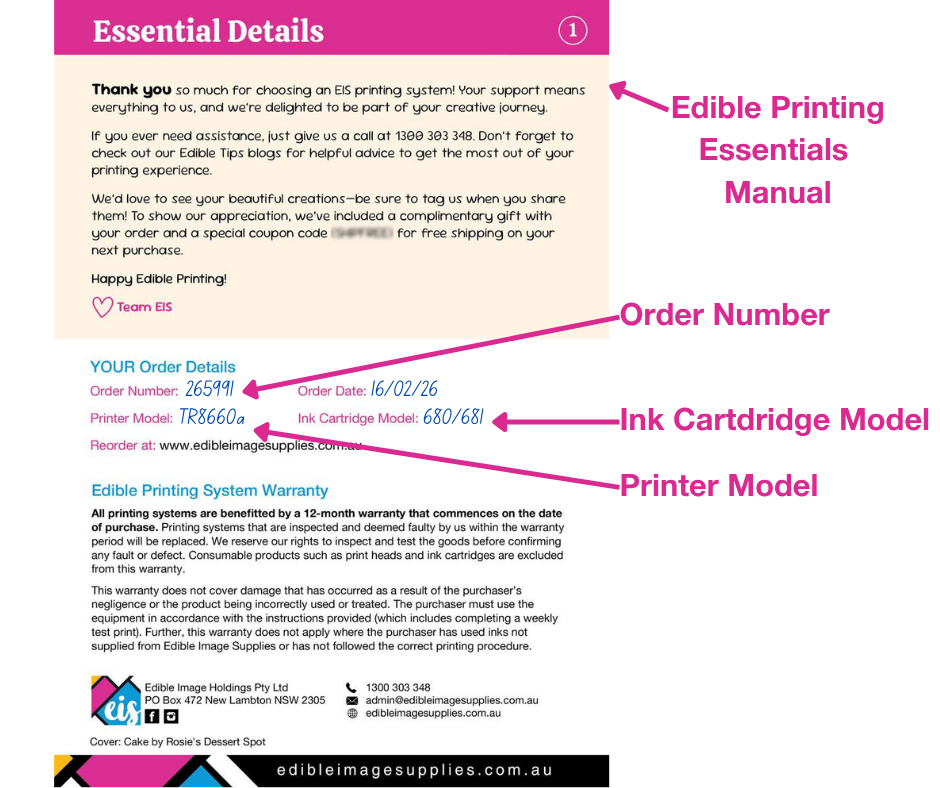
You can check the cartridge model:
- On the chip on the underside of your existing cartridge
- Against the cartridge requirements for your printer model
- In your printer manual
When your new cartridges arrive, it's also worth checking that the cartridge model on your order, the box and the actual cartridge chip all match before installation.
It's a quick check that can save a lot of troubleshooting later.
What Is an Airlock?
Occasionally, a cartridge can develop an airlock, preventing ink from flowing correctly.
One clue is when your printer recognises the cartridge, but the colour isn't printing. In this situation, the cartridge chip is being recognised correctly, but the ink may not be flowing from the cartridge as it should.
Our Edible Ink Cartridge Troubleshooting: Quick & Easy Guide shows you how to check for and release an airlock, and what to do next if the colour still isn't printing.
Quality Matters with Edible Ink and Cartridges
Your cartridge is only one part of the equation. The edible ink inside it matters too.
Edible inks need to be formulated appropriately for the printers they're being used in. Ink viscosity and formulation can affect how the ink flows through the cartridge and printhead, and quality can vary considerably between suppliers.
At Edible Image Supplies, our edible inks are manufactured in Italy to high quality standards, and our edible ink cartridges are selected specifically for use in edible printing.
You can learn more about edible ink and why quality matters in our guide, The Low-down on Edible Ink.
What If My Cartridges Have Been Sitting Unused?
Edible ink printers perform best when they're used regularly.
If a printer sits unused for an extended period, edible ink can begin to dry and affect ink flow through the printhead.
If you haven't used your printer for a while and your prints suddenly have missing colours, lines or a colour that isn't printing at all, the cartridge isn't necessarily the problem.
Your first step should be to print a nozzle check on plain A4 paper. This will show whether all colours are flowing correctly through the printhead.
If your nozzle check indicates a blockage, follow our step-by-step guide to Cleaning a Blocked Printhead in an Edible Ink Printer – Canon.
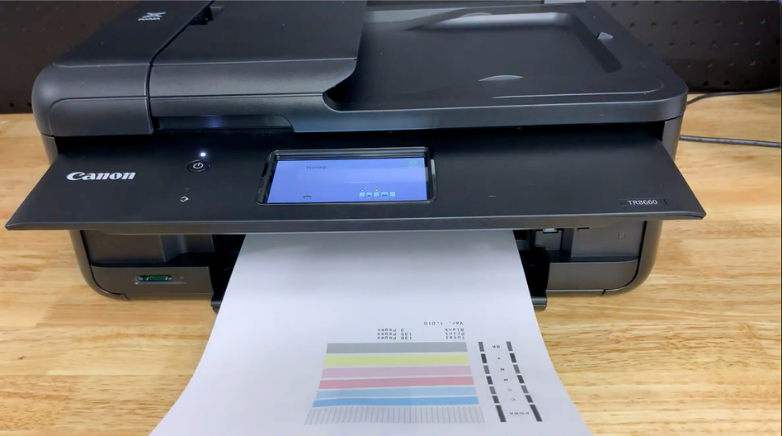
TIP: Avoid repeatedly running cleaning cycles without checking your nozzle check first. Cleaning cycles use a considerable amount of edible ink.
Storing Edible Ink Cartridges
If you have cartridges that won't be used immediately, check the expiry date and follow the recommended storage instructions.
Correct storage helps protect the quality of the edible ink until you're ready to use it.
It's also a good idea to keep your refilling accessories - including those orange cradles - together somewhere clean and easy to find.
Future you will be grateful!
A Little Cartridge Care Goes a Long Way
Refillable edible ink cartridges are an economical and convenient option for edible printing, particularly when they're looked after correctly.
A few simple habits can make a big difference:
- Don't allow your cartridges to run completely dry. (Check the levels by looking at the actual cartridges)
- Refill them using their orange cradles.
- Give the sponge time to absorb the ink after refilling.
- Replace cartridges after the recommended number of refills.
- Use quality edible ink suitable for your printer.
- Use your edible printer regularly.
And remember, if something suddenly stops working, don't automatically assume you need a new printer - or even a new cartridge.
Start with our Edible Ink Cartridge Troubleshooting: Quick & Easy Guide and follow the flowchart. A few simple checks can often help determine whether the issue is the cartridge, its chip, the printer slot or the flow of ink.
Still Need Help?
If you've worked through the troubleshooting guide and you're still having trouble, we're here to help.
When contacting us, please have your order number, printer model, cartridge model and colour ready. Depending on the problem, an exact error message and photos of the cartridge, printer pins, or nozzle check can also help us troubleshoot the issue more quickly.