
Edible Ink Cartridge Troubleshooting: Quick & Easy Guide
Posted by Tanya Montgomery on 23rd Sep 2026
Having trouble with an edible ink cartridge? The good news is that a cartridge that isn't working doesn't necessarily mean the cartridge itself is faulty.
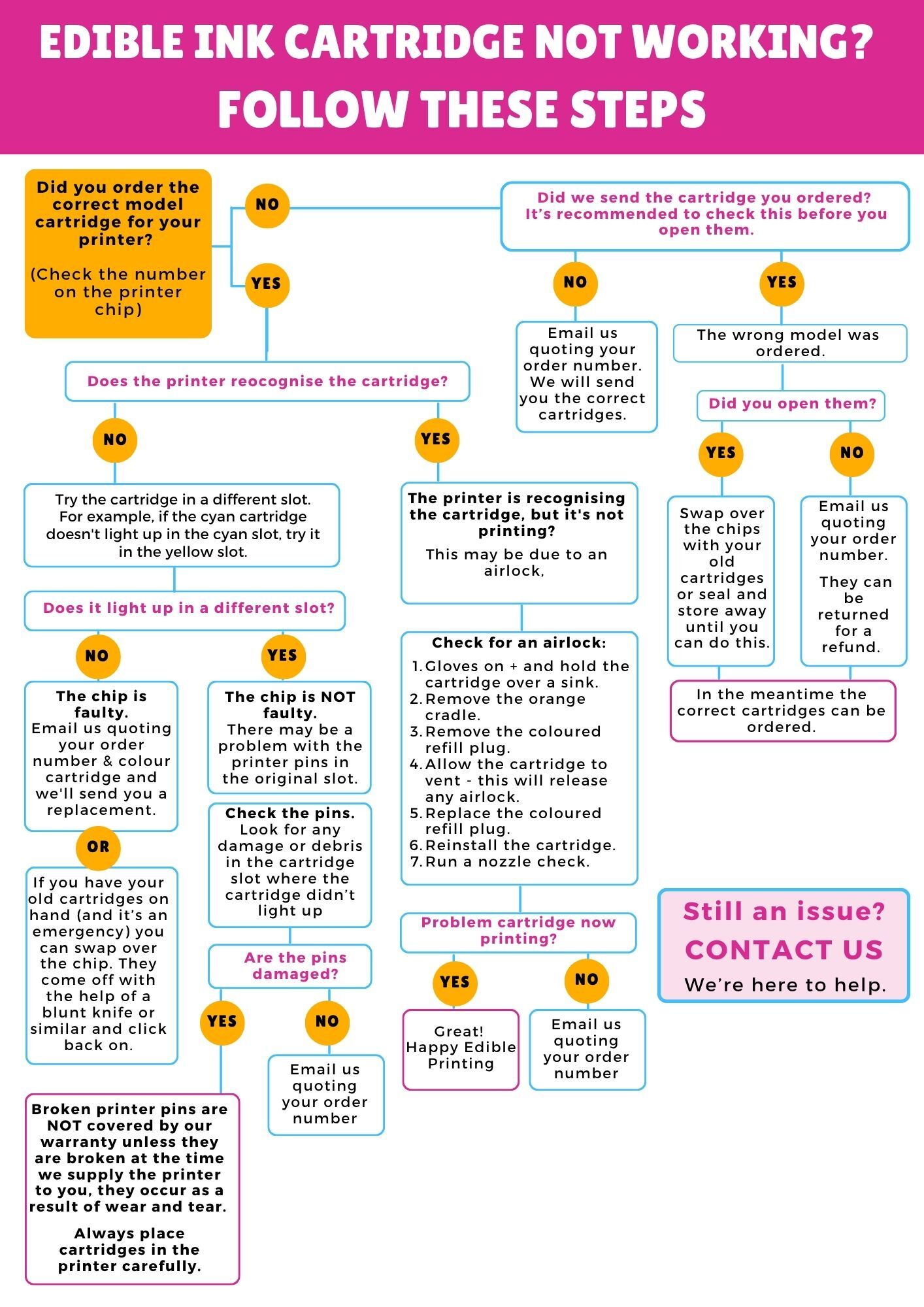
The quickest way to work out what's happening is to follow our Edible Ink Cartridge Troubleshooting Flowchart above. It takes you through a series of simple checks to help determine whether the issue is with the cartridge, its chip, the printer cartridge slot or the flow of ink.
If you'd like a little more information as you work through the flowchart, we've explained each step below.
1. Did You Order the Correct Cartridge for Your Printer?
Before troubleshooting the cartridge itself, first make sure you've ordered the correct cartridge model for your printer.
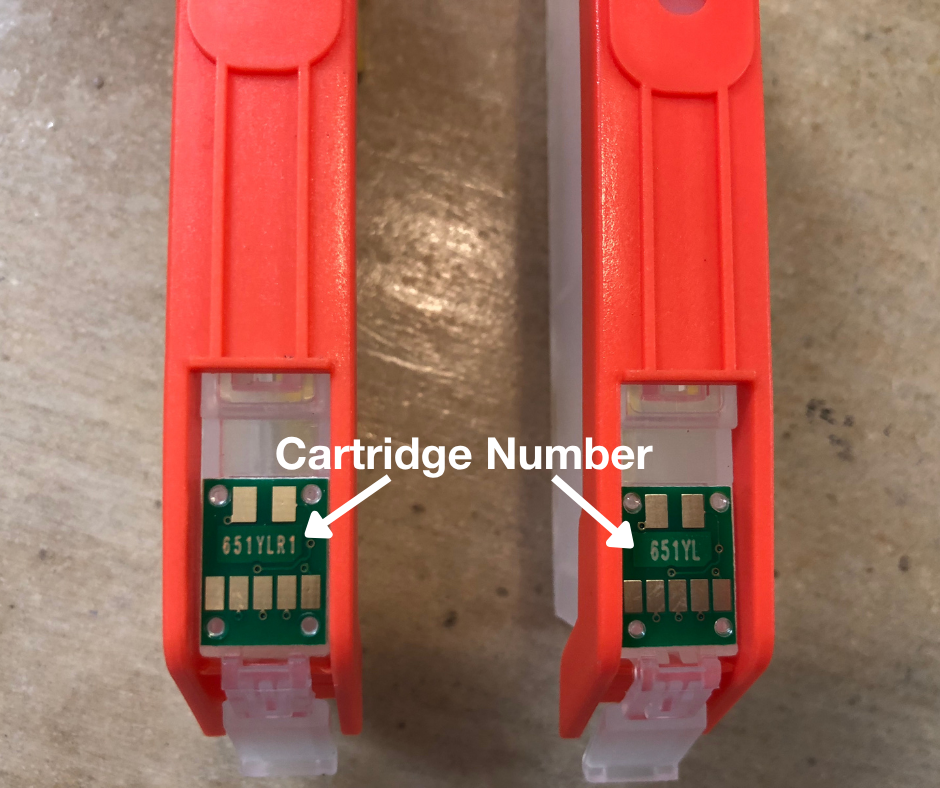
Check the model number on the chip on the underside of the cartridge and compare it with the cartridge model required for your printer.
You can find the correct cartridge model in your printer manual or by checking the cartridges you've previously used successfully in your printer.
Correct cartridge? → Continue to Step 2.
Wrong cartridge or not sure? → Contact us, and we'll help you identify the correct edible ink cartridge for your printer.
2. Did We Send You the Cartridge You Ordered?
Now let's make sure the cartridge you received matches what you ordered.
Check:
- The cartridge model on your order
- The model shown on the box
- The model number on the chip underneath the cartridge
It's important to check both the box and the actual cartridge. Although uncommon, it is possible for the wrong cartridge to be packed inside the correct box.
Everything matches? → Continue to Step 3.
Something doesn't match? → Email us quoting your order number and we'll arrange the correct cartridge.
If we've supplied the wrong cartridge, please let us know whether you've already opened it. Depending on this, we'll advise whether the cartridge needs to be returned or whether you can keep it while the correct cartridge is arranged.
3. Is the Printer Recognising the Cartridge?
Now we need to establish whether the printer is recognising the cartridge.
For our smaller cartridges, check whether the cartridge lights up when it is correctly installed in its slot.
NO — The Printer Isn't Recognising the Cartridge
Rather than immediately assuming the cartridge chip is faulty, there's a simple test that can help determine whether the problem is actually with the cartridge or the printer.
Temporarily place the cartridge into a different cartridge slot.
For example, if the cyan cartridge doesn't light up in the cyan slot, place it in the yellow slot.
You're not trying to print with the cartridge in the wrong position. You're simply checking whether it lights up.
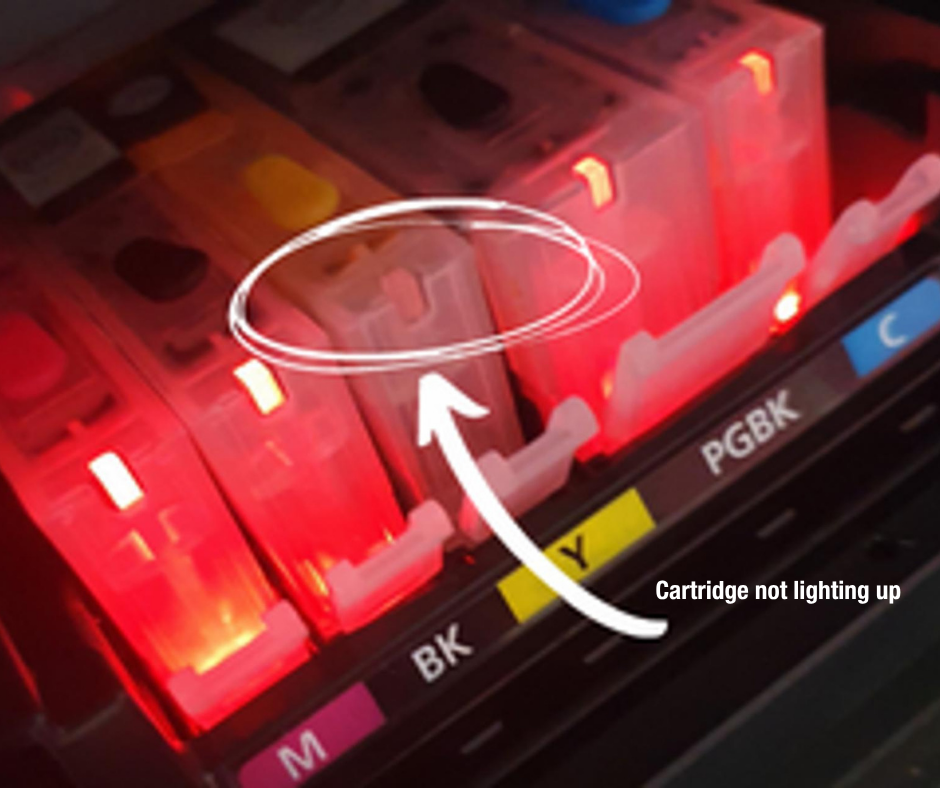
Does It Light Up in a Different Slot?
NO → The chip may be faulty.
If the cartridge doesn't light up in either its correct slot or a different slot, please email us quoting your order number so we can help.
YES → The chip is NOT faulty.
If the cartridge lights up in another slot, its chip is working.
This suggests there may instead be an issue with the printer pins in the cartridge's original slot.
For example, if your cyan cartridge doesn't light up in the cyan slot but does light up in the yellow slot, the cyan cartridge chip is working. The problem may be with the pins in the printer's cyan cartridge slot.
Check the Printer Pins
Look carefully at the pins in the original cartridge slot for any signs of damage or debris.
If you still have one of your old cartridges, you can also insert it into the original slot. If the old cartridge doesn't light up either, this provides another indication that the problem is with the printer slot rather than the new cartridge.
Are the pins damaged?
Important: Broken printer pins are not covered by our warranty unless they were already broken at the time the printer was supplied to you. Damage can occur if cartridges are inserted or removed incorrectly, so always install and remove cartridges carefully.
4. YES — The Printer Recognises the Cartridge, But It Isn't Printing
If the printer recognises the cartridge but the colour isn't printing, this points us in a different direction.
The cartridge chip is being recognised, so the problem may instead be related to ink flow.
One possible cause is an airlock.
5. Check for an Airlock
An airlock can prevent ink from flowing from the cartridge even though the printer is recognising it correctly.
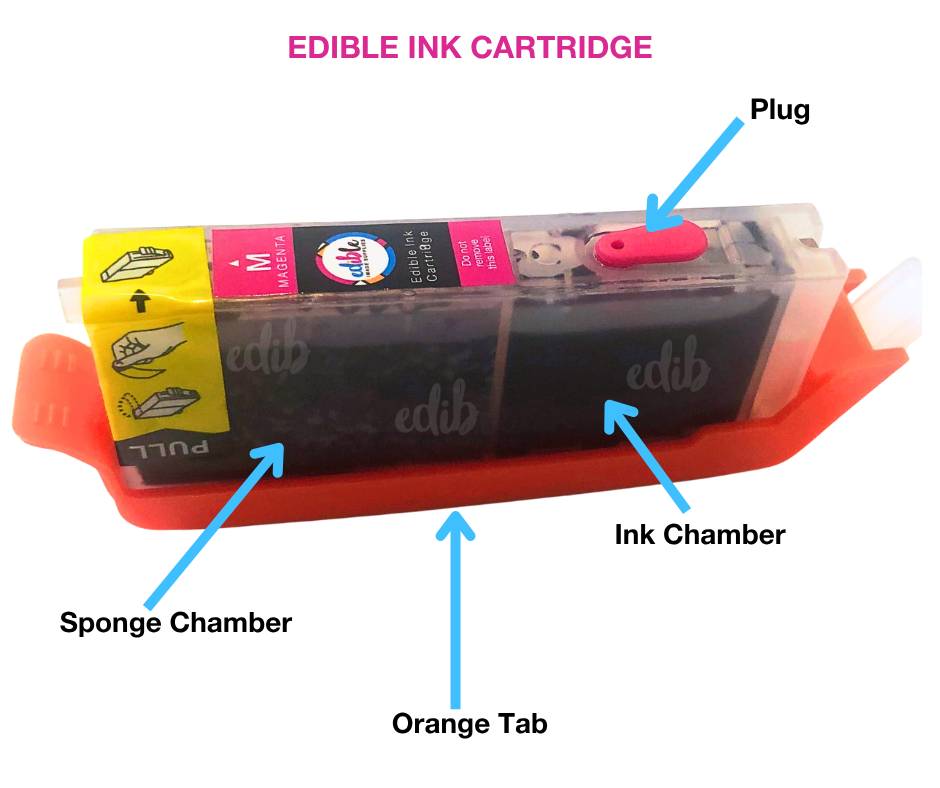
Put on gloves and carry out the following over a sink:
- Hold the cartridge over the sink.
- Remove the orange cradle.
- Remove the coloured refill plug.
- Allow the cartridge to vent. This will release any airlock and may allow the ink to begin flowing.
- Replace the coloured refill plug.
- Reinstall the cartridge.
- Run a nozzle check.
TIP: Keep some paper towel handy. Ink may begin to flow once the airlock is released.
6. Is the Problem Cartridge Now Printing?
YES → Great! Happy edible printing.
NO → Please email us quoting your order number and let us know what you've already tried.
Providing as much information as possible helps us troubleshoot the problem more quickly.
Still Having Trouble?
If you've worked through the flowchart and your cartridge still isn't behaving as it should, we're here to help.
When contacting us, please include where possible:
- Your order number
- Your printer model
- The cartridge model and colour
- Whether the cartridge is new or has previously been refilled
- The exact error message, if your printer is displaying one
- A photo of the cartridge and chip, if relevant
- A photo of the printer pins, if relevant
- A clear photo of your nozzle check
- Details of what you've already tried
The more information you can provide when you first contact us, the easier it is for us to understand what's happening and help get you printing again.
More Edible Printing Help
You may also find these guides useful:
- Edible Ink Cartridges: Care, Refilling & Common Problems
- Printing a Nozzle Check – Edible Ink Printers
- Edible Ink Colours Not Printing Correctly?
- How to Refill Your Edible Ink Cartridges
- Cleaning a Blocked Printhead in an Edible Ink Printer
Our Edible Tips and troubleshooting guides are designed to help you get the best from your edible printing system - whether you're setting up, maintaining your printer or trying to solve a problem.